Use GP Connect to book hub appointments from a GP Practice into an EMIS Hub. This is an alternative to using Cross Organisation Appointments booking via a Data Sharing Agreement.
The huge advantage to using this method is hubs that have activated the Consultation Write Back Enterprise Agreement will not have to Trace patients into the hub.
This article explains what organisations must do to enable GP Connect Appointments between GP Practices and an EMIS Hub.
Create Organisation Group in Hub
Firstly, GP Connect must be enabled in all instances of EMIS that wish to use GP Connect Appointments. In EMIS navigate to Configuration > Organisation Configuration, select Organisation in the left bottom menu. Select your organisation and click on Edit. In the menu select GP Connect Configuration. Check GP Connect, Foundation and Appointments:
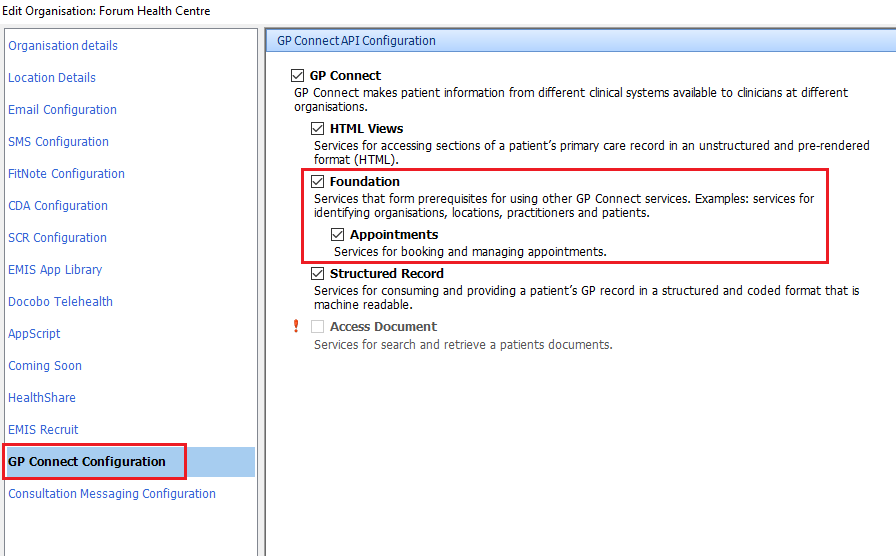
GP Connect must be enabled on the NHS Spine for your organisation National Code. Check with EMIS.

The Organisation Group will automatically appear in each GP Practice EMIS. Each GP Practice must Subscribe to this Organisation Group:

When a GP Practice has subscribed to the Organisation Group the icon will change to Unsubscribe Organisation Group:

Create Appointment Book in Hub
In the Hub create an appointment book. Make sure each appointment book created is GPConnect Bookable:
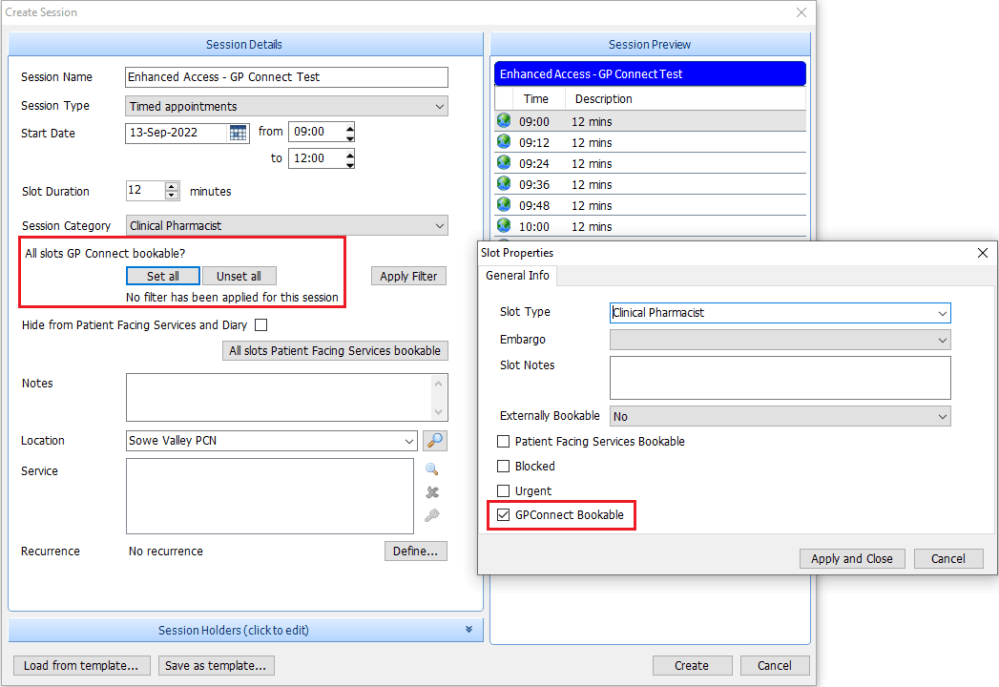
The GP Connect bookable buttons will be greyed out until a Session Holder is added. The Session Holder must have one of the following Job Categories in their EMIS account in the table below. Hubs could create a “dummy practitioner” (using one of the Job Categories below) to use as a session holder for all GP Connect Appointment Sessions.
| R0260 | General Medical Practitioner | R1290 | Pharmacist |
| R0270 | Salaried General Practitioner | R1300 | Psychotherapist |
| R0410 | Student Practice Nurse | R1310 | Clinical Psychotherapist |
| R0600 | Specialist Nurse Practitioner | R1330 | Social Worker |
| R0610 | Sister/Change Nurse | R1450 | Health Care Support Worker |
| R0620 | Staff Nurse | R1480 | Healthcare Assistant |
| R0680 | Midwife | R1550 | Counsellor |
| R0690 | Community Practitioner | R1590 | Phlebotomist |
| R0700 | Community Nurse | R6200 | GP Registrar |
| R0790 | Dietitian | R6300 | Sessional GP |
Filters can also be applied to Appointment Books to limit which organisation groups can see the appointment book. For example Hubs may create an appointment book for 111 and another for Enhanced Access:

If you do not want any other organisations to see slots within an Appointment Session make sure the Number of slots in the filter matches the number of slots within the Appointment Session.
When creating Appointment Books in the PCN Hub use the Session Name and Slot Types to help inform GP Practice booking staff to book into the correct Appointment Books.


These are displayed under Session details in Find GP Connect Appointments. In the diagrams below the Session Name is highlighted red and the Slot Type highlighted blue.

 Digital PCN HUB Optimisation