Interoperability between EMIS Web and SystmOne provides the ability to view important patient details across clinical systems, enabling healthcare professionals to have access to all the information they need in order to improve patient outcomes. EMIS – TPP Direct Interoperability allows Primary and Community Care sites using EMIS Web or TPP SystmOne to see a view of each other’s data from within either clinical IT system via an embedded HTML view.
This functionality in EMIS Web is now available for general release and ordering. The software functionality is provided for free, per EMIS Health mutual agreement with TPP.
Any site, CCG or region interested in this functionality must get approval from their local Business Development Manager, who can then assist with completing the form ”QF1415 EMIS Web and SystmOne Direct Sharing Configuration Request” (download below) to request configuration setup.
A single form must be completed for each project and multiple sites.
How to request to configure direct sharing and viewing with SystmOne
As part of the Interoperability Programme, a CCG, PCN or Trust, can request to configure direct data sharing between organisations using EMIS Web and SystmOne on behalf of their organisations.
EMIS can configure direct sharing with TPP organisations. But before a CCG, PCN or Trust contact Emis Health to request this direct sharing, they need to ensure that the data controller (practice manager, senior partner, lead GP, IG lead or Caldicott guardian) of each organisation (both EMIS and TPP) that you want to include in the direct sharing agreement is happy for the organisation to be included.
Configuration request form
The CCG, PCN or Trust can download and complete the configuration request form below. The completed form (below) must be emailed to both EMIS (CFDataSharing@emishealth.com) and to TPP (helpdesk@tpp-uk.com).
Enter the details of all the organisations, both EMIS and TPP (separate tables are provided for each company) who will be involved in the direct sharing (providing) and viewing (receiving) of data between EMIS Web and SystmOne.
Only those TPP organisations that a patient is also actively registered with will be available to be selected within the share care record view.
What happens next?
A request confirmation email will be sent to the Requesting Organisation contact from EMIS.
When the configuration has been completed by both EMIS and TPP, an email is sent to the Requesting Organisation contact advising that the direct sharing agreement now needs to be activated in Data Sharing Manager for each of their EMIS sharing organisations.
Sharing and viewing data with SystmOne
You’ll need to have a active direct sharing agreement in place with the TPP organisation whose data you want to view. RBAC access is required to view the Care Record.
- Logon to EMIS Web, using a smartcard.
- Press F5 or click the Patient Find icon to select the required patient.
The Summary screen is displayed. - If required, click on the chevron right at the left-hand side of the screen to expand the shared records pane. Select the required organisation from the External Views section.
The selected patient must be actively registered at a TPP organisation that you have a direct sharing agreement with, to be available for selection from the External Views. - Before you can view a patient’s record, you’ll be prompted to confirm that you have permission to do so. Enter a consent reason to complete the Permission to view screen.
After confirming permission to view the patient’s shared record, an HTML view of the patient’s shared record is displayed within EMIS Web (see video above). The HTML view is shown in the TPP View tab above the ribbon, and a yellow banner showing the source of the information is displayed below the patient précis:
The following patient information can be viewed:
- Summary
- Problems
- Medication
- Allergies and sensitivities
- Clinical items (procedures, diagnosis, symptoms)
- Encounters
- Immunisations
- Observations
- Patient details
- Referrals
- Administrative items
- Community data (represented in the views listed above)
You can use the Filter by date range option to view patient information from a specific date range.
You cannot filter by date range when either Allergies and Sensitivities, Patient details, Immunisations or Summary are selected from the TPP View ribbon.
Use the TPP view tab to switch between EMIS Web and this shared record view. There is no copy to record functionality.
No codes from the GP Summary exclusion code list are shared from organisations using EMIS Web by default. The same conditions as those in EMIS Web apply to viewing sensitive patients in TPP View.
Audit Trails
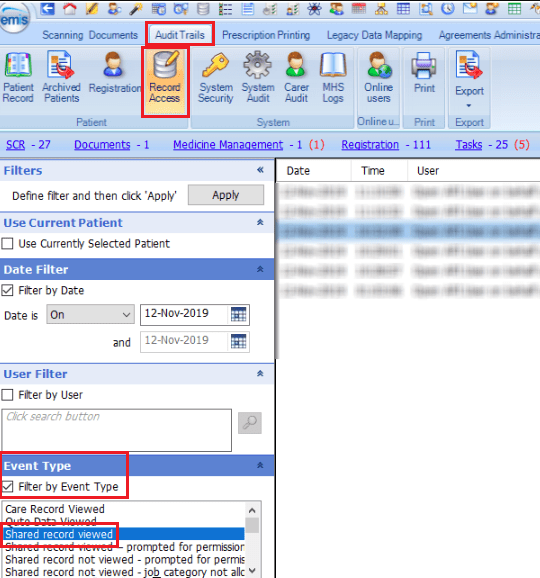
You can view an audit trail displaying users who have viewed shared data from Audit Trails.
- Access Audit Trails.
To access Audit Trails, click the Emis Bubble , point to System Tools and then select Audit Trails. - On the ribbon click Record Access.
- From the navigation pane in the Event Type section, select the Filter by Event Type tick box.
- Select Shared record viewed, and then click Apply.
A list displaying instances that a shared record was viewed is displayed.
Sharing and viewing data with Emis Web
Once enabled by TPP, the SystmOne organisation will need to follow the User Guide below to enable their registered patients records to be viewed in Emis Web:
 Digital PCN HUB Optimisation